

Start with the finished image
You have three possible projects: a short documentary made by a small crew, an unusual camera angle on a compact production rig, or a family memory someone can hold and replay. They call for different tools.
DPReview reports that the Nikon ZR, GoPro MISSION 1 PRO ILS and Fujifilm instax mini Evo Cinema appear among TIME’s Best Inventions of 2026. That is the news peg. It does not make them substitutes, or prove that one produces better pictures than the others.
This Decision Lab asks a narrower question: which design removes an obstacle in the work you actually want to make? Our recommendations concern workflow fit, not measured performance.
Three workflows at a glance
| Your intended result | Camera to consider | Why the design matters | Reason to choose something else |
|---|---|---|---|
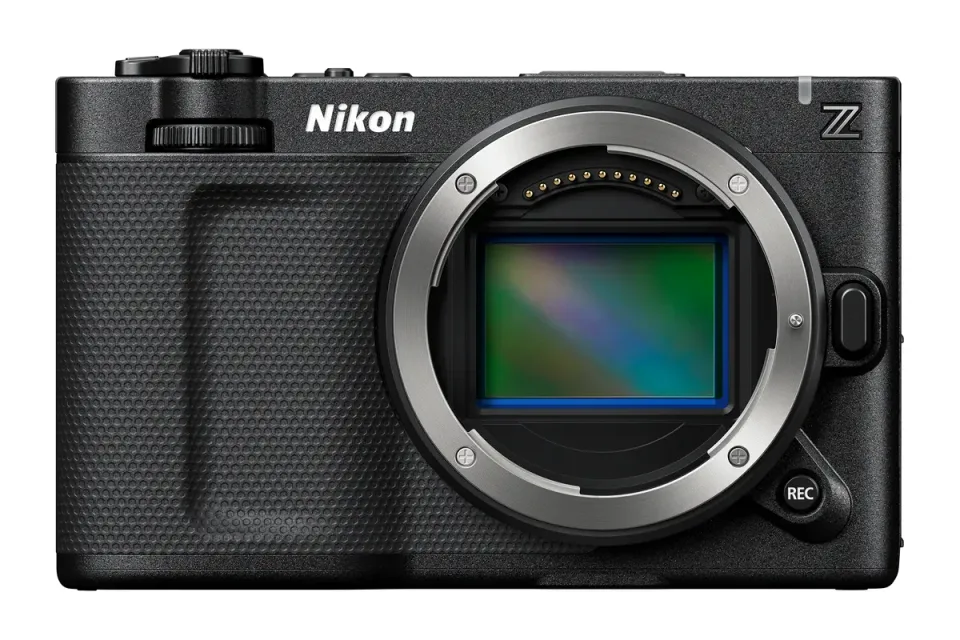
| Portable video production with a small crew | Nikon ZR | Cinema-oriented recording with autofocus and an integrated monitor | You mainly need stills or simple clips and already have a suitable camera |
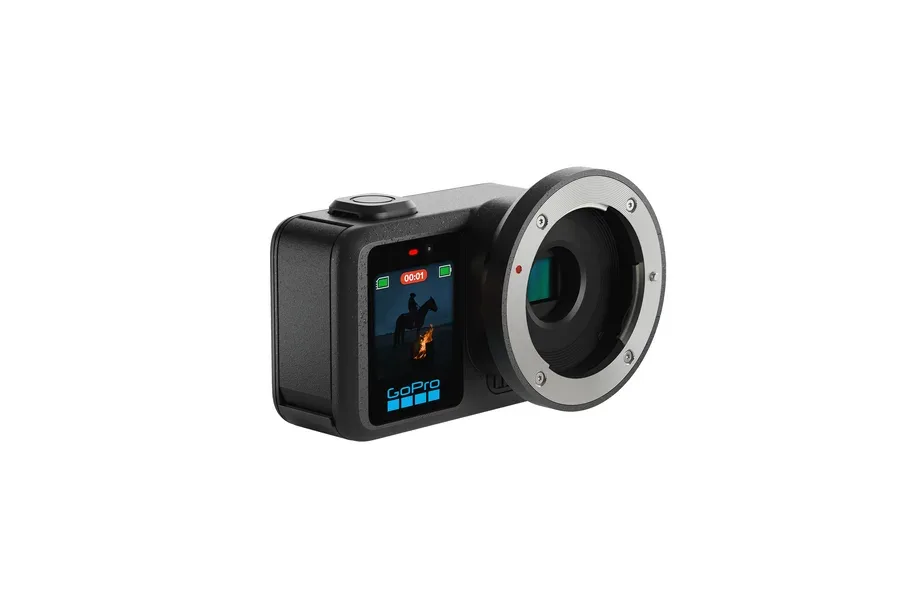
| A compact cinema rig with a chosen lens | GoPro MISSION 1 PRO ILS | Small interchangeable-lens body for planned camera placement | You need easy self-recording, autofocus or underwater use |
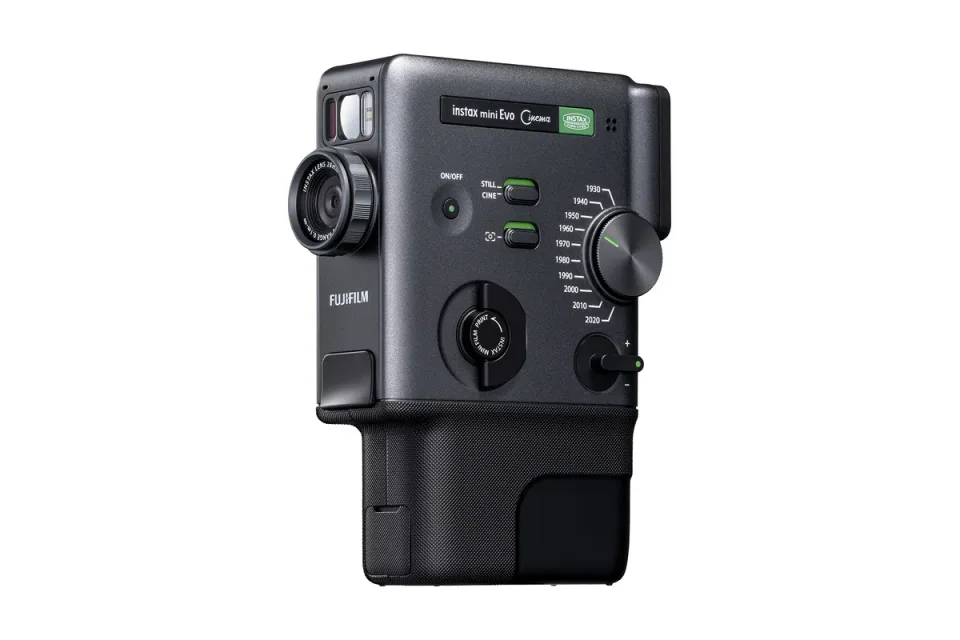
| A physical souvenir linked to a short video | instax mini Evo Cinema | A print becomes the entry point to a shared memory | You want the video file alone or a permanent offline archive |
Nikon ZR: reduce the pieces in a small video kit
Nikon’s US documentation describes a full-frame Z-mount camera with 6K/60p recording, R3D NE, subject-detection autofocus, in-body stabilization and a 4-inch vari-angle monitor. It also lists 32-bit float audio, excluding H.264 recording.
The practical attraction is integration: a solo filmmaker can frame, focus and record with fewer separate components. That does not eliminate the lens, audio placement, storage or editing decisions. Float recording cannot repair a poorly positioned microphone or guarantee clean sound.
Consider it if: you make interviews, documentary sequences or short films and can name the constraint the body solves. Before ordering, test a representative recording format in your editing software and cost the complete lens-and-media package.
Choose another route if: you mostly photograph family life or need straightforward social clips. An existing hybrid camera may already cover both. For a phone-led project, improve microphone placement and lighting first, then see whether a camera upgrade is still necessary.
GoPro MISSION 1 PRO ILS: a small rig, not an automatic setup
GoPro identifies the ILS as a one-inch-sensor camera with a Micro Four Thirds mount. Its appeal is fitting a selected lens and a compact body into a deliberate production setup.
The mount name alone is not a compatibility guarantee. Lens operation and protection need attention before buying; our ILS compatibility guide explains the mechanical mount and manual-focus requirements. The availability and protection guide also distinguishes weatherproofing from underwater suitability. Recheck current manufacturer instructions for the exact lens and firmware.
Consider it if: you already plan camera placement, exposure and focus, and a small lens-changing rig serves that plan. Count lens, support, monitoring and power in the finished setup.
Choose another route if: you want a camera to start recording quickly while you concentrate on an activity. Consider a fixed-lens action camera, checking its exact water rating. For moving self-recording, a camera with suitable autofocus may remove more friction than lens interchangeability adds value.
Instax mini Evo Cinema: make the handover part of the memory
Fujifilm’s workflow combines short clips, stills and printing. Camera clips can total up to 15 seconds. The print is a still with a QR link, not moving imagery stored in film. Playback requires uploading through the app; Fujifilm states that hosted videos remain playable for two years from upload.
Consider it if: handing someone a keepsake is part of the event. The value is the shared object and replay experience, rather than a cinema specification contest.
Choose another route if: your goal is maximum capture quality or a durable video archive. Keep the phone or camera you own, save original files with independent backups, and print a favorite frame separately. A smartphone printer is also worth considering if capture already works for you.
Budget for film, check phone compatibility and get consent before uploading personal clips. Never make the QR print the only copy of a memory.
Before you spend: run one small project
Make a one-minute story with your current equipment. List the moments that failed and why: missed focus, awkward mounting, hard-to-hear speech, an editing bottleneck, or no satisfying way to share the result.
Then ask whether the proposed purchase fixes that specific failure. If mounting was the problem, changing the entire camera system may be unnecessary. If nobody wants an instant print, the Instax experience is unlikely to earn its place. If editing is already overwhelming, more demanding recording formats may add work before they add value.
Buying decision and exact-model checks
The equipment selection contains the three cameras discussed, with no accessory added to fill space. Each has a catalog record and a reciprocal article association. Amazon links are searches with the US affiliate tag, not confirmed exact-model offers. Verify the model, kit contents, seller, warranty and delivery terms yourself. A search result for the fixed-lens MISSION 1 PRO is not the ILS; a standard mini Evo is not the Cinema model.
Our verdict: choose the ZR for an integrated small-production workflow, the ILS for planned compact manual-lens rigs, and the Instax for the experience of giving a video-linked print. Keep your current equipment when it already makes and shares the work you want.
Transparent evidence
Method and limitations
Documentary Decision Lab checked October 19, 2026. Manufacturer documentation establishes product design; buyer profiles and alternatives are editorial judgments. DPReview's indexed report supplies the award context, not a performance ranking. No camera was physically evaluated for this comparison.
- No comparative measurements of image quality, autofocus, stabilization, heat or battery life are available from this article.
- No exact Amazon US ASIN or live retailer inventory has been confirmed. Merchant destinations are labeled searches, not exact offers.
- The cover depicts generic AI-generated equipment. Product cards use distinct manufacturer photographs, not comparative sample images.
Five key takeaways
- An invention award does not establish which camera suits your work.
- The ZR brings cinema recording, autofocus and a large monitor into one body.
- The ILS requires a deliberately chosen manual lens, not just any MFT lens.
- Instax prints a still with a QR link; the video is hosted online for a stated two years.
- Compare the complete workflow and recurring costs before comparing bodies.
Frequently asked questions
Which of these cameras is best for a beginner?
Start with the intended result. A phone may be enough for everyday video; the ILS adds manual lens operation, while the Instax prioritizes a physical keepsake. None wins simply because it received an award.
Does Instax really print a moving video?
No. It prints a still image with a QR link to hosted video. Fujifilm states a two-year playback period from upload, so save the original video separately.
Is the MISSION 1 PRO ILS the fixed-lens MISSION 1 PRO?
No. ILS is the interchangeable-lens version. Lens compatibility, focusing and water protection must be checked for that exact model.
Primary sources
- dpreview.com · Verified 2026-10-19
- nikonusa.com · Verified 2026-10-19
- nikonusa.com · Verified 2026-10-19
- gopro.com · Verified 2026-10-19
- gopro.my.site.com · Verified 2026-10-19
- fujifilm.com · Verified 2026-10-19
- instax.com · Verified 2026-10-19